
Help
Adding a Functoid
Help menu
- Help content
- AS2
- Examples and Tutorials
- IO Queues and Forms
- Maps
- Schemas
- Send and Receive Ports
- Send and Receive Ports / Transports
- Servers
- Static Configuration
- Tracking
- Workflows
- Workflows / Workflow Activities
- Call Web Service Direct Activity
- Compensatable Sequence Activity
- Compensatable Transaction Scope Activity
- Compensate Activity
- Conditioned Activity Group
- Database Activity
- Delay Activity
- Event Handling Scope Activity
- Event Driven Activity
- Expression Activity
- Fault Handler Activity
- If Else Activity
- Increment Activity
- Invoke Web Service Activity
- Invoke Blue Integrator Workflow Activity
- Invoke Workflow Activity
- Listen Activity
- Map Activity
- Parallel Activity
- Policy Activity
- Send Receive Port Response Activity
- Replicator Activity
- Send Receive Port Response Activity
- Send Port Message Activity
- Sequence Activity
- Suspend Activity
- Synchronization Scope Activity
- Transaction Scope Activity
- While Activity
To add a Functoid for an assembly to Blue Integrator Explorer, expand the Static Configuration section and then click on Functoids. The right pane will show any Functoids already configured.
To add a new functoid, click the Add Functoid… button and this dialog appears:
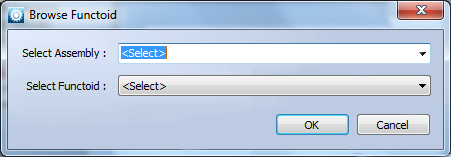
The Select Assembly drop-down list shows all assemblies configured in the Blue Integrator repository. Select the appropriate assembly, or <Browse> to select an external assembly. The Select Functoid drop-down list will then show all functoids that apply to that assembly. If there are no Functoids available for the selected assembly, and error dialog is displayed.
 + 46 729 64 80 15
 Star street 1, SE-512 50 SVENLJUNGA